Digital Decluttering: Sharpen Focus and Shrink Your Carbon Footprint


Digital decluttering is the practice of clearing the files, emails, tabs, and notifications that quietly drain your attention and, less obviously, burn electricity in a data center somewhere. If your focus feels shredded by mid-morning and your cloud storage keeps creeping toward “full,” a deliberate digital cleanup is one of the highest-leverage habits you can build. In my own work as a workplace-wellness practitioner, tidying my digital workspace did more for my concentration than any productivity app I ever installed, and it trimmed a small but real slice off my carbon footprint at the same time.
The premise is simple: a cluttered screen taxes your brain the same way a cluttered desk does, and every stored file or unread newsletter sits on a server that runs on power. Clean both up, and you feel sharper while wasting less. Below is exactly how I do it, backed by what the research actually says.
Key Takeaways
- Digital decluttering sharpens focus: visual and cognitive clutter compete for the same attention your brain needs for deep work, so clearing it lowers stress and recovery time.
- It has a genuine sustainability angle: the files and emails you hoard live on servers, and data centers already consume roughly 1.5% of the world’s electricity.
- Small, repeatable routines beat heroic purges: a weekly ten-minute reset keeps clutter from rebuilding faster than you can clear it.
- Fewer inputs equal fewer interruptions: unsubscribing and muting notifications attacks clutter at the source, not just the symptom.
- The payoff is measurable: less time lost searching, a lighter cloud bill, and a calmer, more sustainable way of working.
What Digital Clutter Actually Costs You
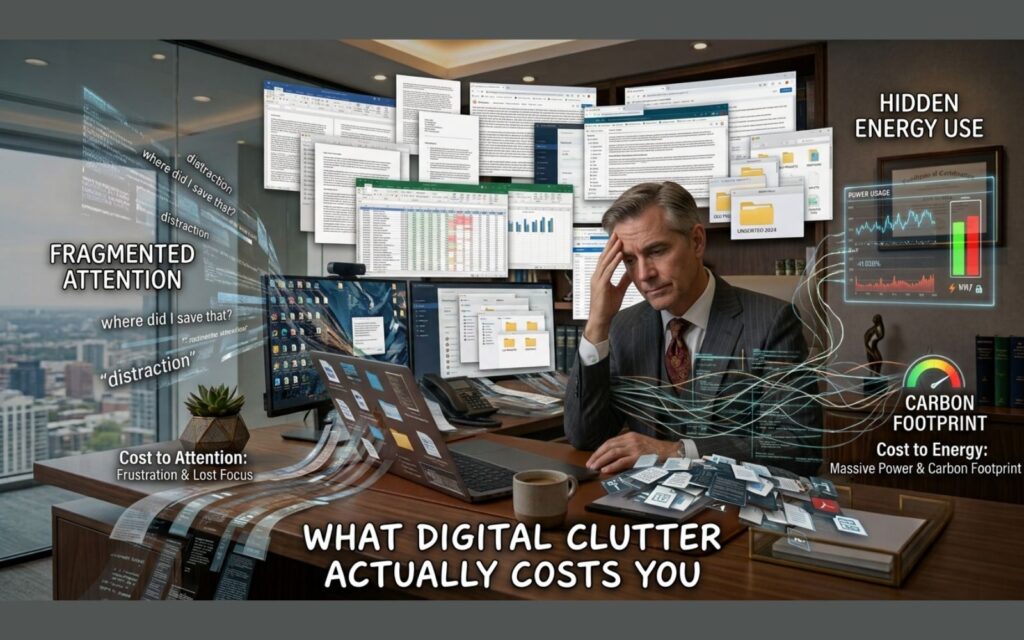
We tend to treat digital mess as harmless because it’s invisible until we open a folder. But the cost shows up in two places: your attention and your energy use. Understanding both is what turned digital decluttering from a chore into a habit I genuinely protect.
The focus tax of a messy digital workspace
Your brain doesn’t ignore clutter, it processes it. Researchers at the Princeton University Neuroscience Institute used fMRI imaging to show that multiple competing stimuli in your visual field fight for the same neural resources you rely on to concentrate, which means a crowded desktop or a wall of browser tabs measurably erodes your ability to focus. You can read the underlying peer-reviewed work on the neural evidence for distractor suppression if you want the primary source.
Then there’s the interruption cost. Every notification badge and half-read email is an invitation to switch tasks, and switching is expensive. Work by Gloria Mark, a professor at the University of California, Irvine, found that after a single interruption it takes an average of 23 minutes and 15 seconds to return to the original task at the same depth of focus. A cluttered digital space is essentially an interruption machine, generating those context switches all day long.
The scale of lost time is staggering when you add it up. A widely cited McKinsey analysis found that knowledge workers spend around 1.8 hours every day, roughly 9.3 hours a week, simply searching for and gathering information. A meaningful chunk of that hunt happens because files, notes, and messages are scattered and poorly named. Decluttering is, in part, just making your own stuff findable again.
The hidden carbon cost of storage and email
Here’s the part most focus advice skips: your digital clutter has a physical footprint. Every photo you never look at, every draft you’ll never send, and every archived thread sits on a hard drive in a data center that consumes electricity around the clock. According to the International Energy Agency, data centers accounted for about 1.5% of global electricity use in 2024, and consumption has grown roughly 12% per year since 2017. You can see the full breakdown in the IEA’s Energy and AI report.
Email is the everyday example. In the 2020 edition of How Bad Are Bananas?, researcher Mike Berners-Lee estimated a standard email at roughly 0.3 grams of CO2 equivalent, rising to about 26 grams for a marketing email blasted to a hundred people and read by one. Individually trivial; collectively enormous. The Radicati Group estimates that around 376 billion emails were sent and received worldwide every day in 2025. No single deletion saves the planet, but the mindset of not generating and storing needless data is exactly the sustainability habit that scales.
I don’t declutter my inbox to single-handedly cut emissions. I do it because the same action that calms my attention also nudges my digital life toward being lighter and less wasteful, and those two wins reinforce each other.
How I Run a Digital Declutter
My approach is deliberately unglamorous. I don’t try to reach “inbox zero” in one weekend, because clutter that took a year to build won’t vanish in an afternoon and the crash purge never sticks. Instead I work in passes, starting with whatever is stealing the most attention.
Start with the inbox
The inbox is where clutter and interruption overlap most, so I start there. First, I archive or delete anything older than a rolling window, keeping only what I genuinely reference. Search has become good enough that filing everything into fifty folders is wasted effort; a flat archive plus good search beats an elaborate hierarchy you have to maintain.
Next, I turn off email notifications entirely and check on a schedule instead. If a single interruption costs 23 minutes of refocusing, an inbox that pings every few minutes is quietly demolishing your deep-work capacity. Batching email into two or three defined windows a day is one of the simplest changes with the biggest return, and it pairs naturally with the kind of intentional structure I describe in my guide to building a daily routine for success.
Tame your files and cloud storage
Files are the clutter you forget about because they’re tucked inside folders. I do an annual sweep of Downloads, Desktop, and my cloud drive, because those three collect the most junk. Duplicate screenshots, finished-project exports, and “final_v7” documents are the usual suspects.
The rule I follow: if I haven’t opened it in a year and I couldn’t reconstruct why I’d need it, it goes. Emptying the trash afterward matters too, since files in a recycle bin still occupy storage. This is where the sustainability angle gets concrete. Deleting the 4,000 near-identical burst photos on my phone won’t reverse climate change, but multiplied across a team or a company, trimming redundant storage is a legitimate way to reduce the energy your work quietly demands.
Close the tabs and quiet the notifications
Open browser tabs are the modern equivalent of a desk buried in paper. Each one is a small open loop, and open loops are precisely the competing stimuli the Princeton researchers flagged. I keep a hard cap on tabs and use a read-later tool for anything I’m tempted to keep “just in case.”
Notifications get the same treatment. I audit every app’s permission to interrupt me and revoke it unless the interruption is genuinely time-sensitive. The goal isn’t to be unreachable; it’s to decide, on purpose, what earns the right to break my concentration. That single boundary protects focus better than any amount of willpower, and it lowers the ambient stress that clutter and constant pinging create.
Unsubscribe and reduce incoming clutter
Decluttering that only clears what’s already arrived is like bailing a boat without patching the leak. The durable fix is reducing inflow. Every time a newsletter or promotional email lands that I don’t read, I unsubscribe on the spot rather than deleting it and letting the next one come. Within a couple of weeks the volume drops sharply.
This is the rare habit that helps focus and footprint simultaneously. Fewer marketing emails means fewer interruptions and, given that a marketing blast can carry many times the carbon of a personal note, a small reduction in the data being generated on your behalf. It’s the digital equivalent of refusing junk mail at the door.
Building a Sustainable Digital Routine
A one-time cleanup feels great for about a week, and then entropy wins. What actually keeps a digital workspace clear is a rhythm, the same way physical tidiness comes from small daily habits rather than seasonal deep-cleans.
Weekly and monthly rhythms
My weekly reset takes about ten minutes every Friday: clear the Downloads folder, close stray tabs, archive the week’s dead email threads, and empty the trash. It’s short enough that I never dread it and frequent enough that clutter never accumulates into a wall.
Once a month I go a level deeper, reviewing cloud storage, pruning duplicate files, and unsubscribing from anything I ignored all month. Quarterly, I audit apps and subscriptions I no longer use. Layering these cadences means no single session is overwhelming, and the digital environment stays in a state where focus is the default rather than something I have to fight for. Protecting that calm also protects rest, which is why I treat it as part of the same wellness system as good sleep hygiene for better health.
Tools and defaults that keep clutter low
The best decluttering tool is a good default. I set my camera to periodically back up and clear, my browser to close tabs on quit, and my inbox to auto-archive low-priority senders. Defaults do the maintenance for you so discipline isn’t required daily.
I’m also deliberate about what I adopt. Every new app, account, and subscription is a future source of clutter and notifications, so I add them slowly and remove them freely. Treating “delete the account” as a normal, healthy action, rather than a failure, keeps my digital surface area small. A smaller surface area is easier to focus within and lighter on the servers behind it.
Summary
Digital decluttering earns its place in a wellness routine because it pays off twice. On the focus side, clearing the visual and cognitive noise removes the competing stimuli that fragment attention and the interruptions that cost 23 minutes each to recover from. On the sustainability side, generating and storing less data is a small, scalable way to ease the energy demand of the data centers that now run a growing share of the world’s electricity.
You don’t need a dramatic overhaul. Start with the inbox, tame your files, close the tabs, cut the inflow, and then protect it all with a short weekly rhythm and smart defaults. The result is a workspace that feels calmer, a workday with fewer things quietly pulling at you, and a digital life that wastes a little less. That combination, better focus and lighter impact, is the whole reason I keep coming back to it.
Frequently Asked Questions
How often should I do a digital declutter?
A short weekly reset of about ten minutes handles the everyday buildup: clearing downloads, closing tabs, and archiving dead email threads. Layer a deeper monthly review of cloud storage and subscriptions on top, plus a quarterly audit of unused apps and accounts. Frequent and small beats rare and overwhelming, because clutter rebuilds faster than most people expect.
Does deleting emails and files really help the environment?
Not dramatically on an individual level, and it’s worth being honest about that. A single email carries only a fraction of a gram of CO2 equivalent. The meaningful impact comes from the habit at scale: generating and storing less data reduces the load on data centers, which the International Energy Agency reports already use around 1.5% of global electricity. Think of it as one modest, repeatable sustainability practice rather than a silver bullet.
What should I declutter first for the biggest focus boost?
Start with whatever interrupts you most, which for most people is the inbox and app notifications. Turning off nonessential notifications and batching email into set windows immediately cuts the interruptions that research links to roughly 23 minutes of lost refocusing time each. That single change tends to deliver the fastest, most noticeable improvement in concentration.
Will I lose something important if I delete too aggressively?
The safe rule is to archive rather than permanently delete when you’re unsure. Modern search makes a flat archive easy to mine later, so you rarely need to keep files visible and in your face to keep them accessible. Reserve permanent deletion for obvious duplicates, finished exports, and junk mail, and empty the trash only once you’re confident.
How is digital decluttering different from a productivity app?
A productivity app adds a tool; digital decluttering removes friction. Apps can help, but they often become another source of notifications and clutter themselves. Decluttering works on the environment your attention lives in, so the gains persist even when you’re not actively using any particular system. In my experience, clearing the space beats adding another layer on top of a messy one.




2 Comments