Checklists at Work: A Simple Tool for Fewer Mistakes

Checklists at work are one of the cheapest productivity tools you can use: a short written list of the few steps you must never skip, checked at a set moment, so your memory does not have to carry them. In my experience, they cut rework, calm the end-of-day scramble, and even trim wasted energy when you use them to shut down your workspace properly.
The strongest evidence for checklists comes from hospitals, not offices, so I will be careful about how far I stretch it. This article is general productivity guidance, not medical, legal, or safety-compliance advice. If your job has regulated procedures, your official procedures always come first.
Here is what the research actually shows, where checklists fail, and how I build them for ordinary knowledge work in a way that is short enough to survive a busy week.
Key Takeaways
- Checklists at work protect the steps you already know but forget under pressure, interruption, or fatigue.
- The landmark evidence is medical: a World Health Organization surgical checklist study linked the tool to fewer complications and deaths across eight hospitals.
- Checklists fail when they are mandated without buy-in. A large Ontario study found no improvement after hospitals were required to adopt one.
- Good checklists are short (roughly five to nine items), tied to a clear pause point, and cover only the “killer” steps.
- An end-of-day shutdown checklist can close open loops in your head and cut idle electricity use from office equipment.
Why Checklists at Work Matter More Than They Look
Most workplace mistakes are not caused by ignorance. They happen when a capable person skips a step they know perfectly well, because they were rushed, interrupted, or on autopilot. A checklist does not teach you the job; it catches the lapse.
The most cited demonstration comes from surgery. In a study led by the Harvard School of Public Health with the World Health Organization, eight hospitals introduced a one-page safety checklist. The Harvard Gazette reported that major complications fell from 11 percent to 7 percent, and inpatient deaths fell from 1.5 percent to 0.8 percent, across data from 7,688 patients.
That is an operating room, not a marketing team or a finance desk. I am not claiming an office checklist will produce anything like those numbers. The useful lesson is narrower: even highly trained experts miss routine steps, and a short, structured pause at the right moment catches a meaningful share of those misses.
The checklist in that study took only a few minutes and was used at three specific junctures, such as before the skin incision. That detail matters more than the list itself, and I come back to it below.
What Problem Is a Checklist Actually Solving?
I find it helps to name the failure a checklist prevents, because it tells you what belongs on the list and what does not.
Interruptions Break the Sequence
Knowledge work is full of multi-step procedures: publishing a report, sending an invoice, onboarding a client, closing the month. Interruptions land in the middle of those sequences constantly. When you return, it is easy to resume one step too late.
A Michigan State University experiment showed how little it takes. In the study of 300 participants, interruptions lasting about 2.8 seconds doubled the rate of sequence errors on a step-by-step computer task. The lead researcher, Erik Altmann, attributed this to the shift of attention itself rather than lost time.
That finding is why I pair checklists with the ideas in my piece on context switching at work. You cannot remove every interruption, but you can make it cheap to find your place again. A checklist is a bookmark for procedures.
Unclear Expectations Hide the Finish Line
The second failure is subtler: many people are not sure what “done” looks like. Gallup’s January 2026 engagement report found that clarity about what is expected at work showed the largest decline of any engagement item since 2020, down nine points for U.S. employees.
The same Gallup analysis found only about one in five managers and individual contributors strongly agree they have a clear definition of exceptional performance. Those who did were nearly four times as likely to be engaged. A “definition of done” checklist is a small, practical way to make the finish line visible.
When Checklists at Work Fail
I would be doing you a disservice if I only shared the success stories. Checklists have a well-documented failure mode, and it is the one most organizations walk straight into.
The Ontario Lesson: Mandates Are Not Adoption
After the surgical results spread, Ontario required its hospitals to use surgical safety checklists. Researchers then compared outcomes before and after the mandate across 101 acute care hospitals. According to the Agency for Healthcare Research and Quality’s summary, none of the surgical outcomes improved.
The explanations offered were revealing. Complication rates before the mandate were already about as low as the improved rates in earlier studies, and the reviewers suggested checklists may not help much once rates fall below a certain threshold. An accompanying editorial by Dr. Lucian Leape argued that checklists work when they are adapted to local conditions, trained, built into a consistent workflow, and involve the whole team. Atul Gawande, a co-author of the original study, raised methodological concerns about the Ontario analysis, so the debate is not settled.
For office work, I take one clear message from this: a checklist handed down from above and ticked for compliance becomes theater. A checklist the team writes for itself, around the mistakes it actually makes, tends to stick.
The Michigan Lesson: The List Is Only Part of It
The other famous hospital example points the same way. In the Keystone ICU project, 103 intensive care units in Michigan adopted five evidence-based prevention steps recommended by the CDC. The effort nearly eliminated catheter-related bloodstream infections in most of those units over an 18-month follow-up.
Retellings often reduce this to a checklist, but the project also worked on safety culture, ran a central education program for team leaders, and partnered closely with infection-control staff. The list of steps was one visible piece of a larger change in how people worked together. That is a useful caution against expecting a template to do the heavy lifting.
How I Build Checklists at Work That People Actually Use
Over the years I have written plenty of checklists that nobody used, including myself. The ones that survived share a few traits. Gawande’s own summary is the best short rule I know: checklists should be “short, extremely simple, and carefully tested in the real world.”
1. List Only the Killer Steps
A checklist is not a manual. I include only the steps that are easy to skip and costly to miss. If a step is impossible to forget, it wastes a line. Five to nine items is my usual ceiling; past that, people start skimming, which defeats the purpose.
2. Tie It to a Pause Point
The surgical checklist worked at fixed moments: before anesthesia, before incision, before the patient is taken out of the operating room. I copy that idea. My checklists live at transitions, such as “before I hit send on a client proposal” or “before I close the laptop,” not as a floating reminder I might glance at someday.
3. Choose Read-Do or Do-Confirm
There are two styles. A read-do checklist is followed line by line, which suits rare or unfamiliar tasks. A do-confirm checklist lets you work from memory and then pause to confirm nothing was missed, which suits routine work you do weekly. Most of my office checklists are do-confirm because they respect expertise while still catching lapses.
4. Write the Items as Checkable Facts
“Review the document” cannot be verified. “Numbers in the summary match the attached spreadsheet” can. I phrase each item so that a colleague could look and say yes or no. This also doubles as the definition-of-done clarity that the Gallup data suggests many people lack.
5. Test, Trim, and Revisit Monthly
I run a new checklist for two or three weeks, then cut anything I always tick without thinking and add anything that caused a real mistake. A checklist that never changes is usually one nobody is reading anymore.
Checklists at Work That Earn Their Place
These are the checklists I recommend most often, because they cover the moments where skipped steps are common and expensive.
- Pre-send checklist: correct recipients, attachment actually attached, numbers checked against source, clear ask and deadline.
- Meeting close checklist: decisions restated, owners named, due dates set, notes shared.
- Handoff checklist: status, open risks, where files live, who to ask, what is due next.
- Weekly review checklist: inbox triaged, calendar checked for the next two weeks, top priorities chosen, stalled items flagged.
- End-of-day shutdown checklist: covered in detail below, because it also carries a sustainability payoff.
A useful companion habit is setting defaults so that fewer steps need checking at all. I wrote about that approach in default settings at work. The best checklist item is often one you automated away.
The Sustainability Side of Checklists at Work
This is where checklists meet the green side of this site. Office equipment left running overnight quietly wastes energy, and it is exactly the kind of step people know about and skip when they rush out the door.
The U.S. Department of Energy calls letting equipment go to sleep after inactivity “the single most effective means of saving energy” for computers. Its Energy Saver guidance suggests enabling monitor sleep if you will be away for more than 20 minutes, and switching off both the computer and monitor if you will be away for more than two hours.
The same guidance notes that ENERGY STAR computers use 30 to 65 percent less energy than non-labeled ones, depending on use, and that screen savers are not energy savers. The Department of Energy also cites an ENERGY STAR estimate that power-management features can save up to $30 a year on electricity bills.
Thirty dollars sounds small for one person. Across a team, and across years, it adds up, and so does the reduced heat load on the building’s cooling. A checklist turns these good intentions into a thirty-second routine.
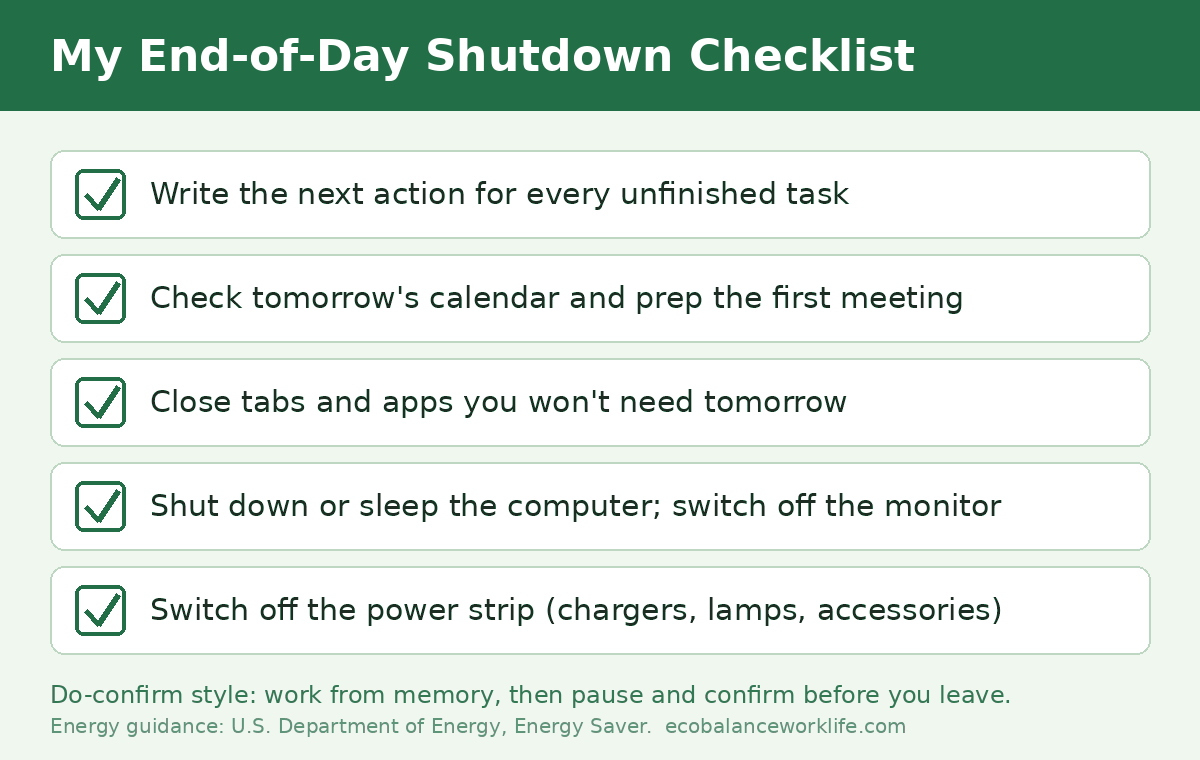
My End-of-Day Shutdown Checklist
- Write down the next action for every unfinished task.
- Check tomorrow’s calendar and prepare anything the first meeting needs.
- Close all tabs and applications I will not need tomorrow.
- Shut down or sleep the computer and switch off the monitor.
- Switch off the power strip for chargers, lamps, and accessories.
The first item does double duty. Writing down a concrete next step is my practical answer to the unfinished-task nagging I described in my article on the Zeigarnik effect at work. I leave with a clearer head, and the office draws less power overnight.
How to Introduce Checklists to a Team
If you lead a team, the Ontario experience is your warning label. In Gallup’s January 2026 report, 35 percent of employees who answered an open-ended question said better communication would most help them understand what is expected at work. A checklist should be part of that conversation, not a replacement for it.
What works for me is simple. I ask the team which mistakes cost us the most time in the past quarter. We draft a checklist for that one moment together, trial it for a few weeks, then decide as a group whether to keep, change, or drop it.
I also make it acceptable for anyone, including the most junior person, to call a pause and run the checklist. The surgical checklist research emphasized teamwork as much as the list, and that principle travels well to meeting rooms and shared inboxes.
Summary
Checklists at work are a low-cost way to protect the steps that matter most when you are busy, interrupted, or tired. The strongest evidence comes from hospitals, where a short checklist was linked to fewer complications and deaths, but the same research also shows that mandated checklists without buy-in can achieve nothing measurable.
The version that works is short, tied to a clear pause point, written around real mistakes, and revised regularly. Start with one checklist for one recurring moment, ideally an end-of-day shutdown, and you gain both a calmer finish to your day and a small cut in wasted energy.
Frequently Asked Questions
Do checklists at work actually improve productivity?
Research suggests checklists reduce missed steps in complex, repeated procedures, which cuts rework and error correction. Most of the strong evidence comes from healthcare rather than offices, so treat it as a promising principle rather than a guaranteed productivity gain for your specific job.
How many items should a workplace checklist have?
I aim for five to nine items. Include only the steps that are easy to skip and costly to miss. Longer lists invite skimming, which means people tick boxes without checking anything.
What is the difference between a to-do list and a checklist?
A to-do list changes every day and tracks what you plan to do. A checklist stays mostly the same and protects how you do a recurring task, making sure the critical steps happen every time.
Why do some checklists fail?
They fail when they are imposed without buy-in, when they are too long, or when nobody knows when to use them. The Ontario study of mandatory surgical checklists is the best-known example of a rollout that showed no measurable improvement.
Can a checklist help reduce energy use at the office?
Yes, indirectly. An end-of-day shutdown checklist makes it routine to sleep or switch off computers and monitors and turn off power strips, which the U.S. Department of Energy recommends for saving energy.
Should I use paper or digital checklists?
Use whichever you will see at the pause point. A laminated card by the monitor works well for a shutdown routine, while a template inside your project tool suits handoffs and publishing. Reusable formats avoid the paper waste of printing a fresh list every day.